- What it does: Provides temporary physical radio isolation for compatible enclosed devices.
- Useful for: Phones, key fobs, and other wireless electronics — when radio isolation is actually required, not by default.
- Not the same as: A basic RFID-blocking passport or credit-card sleeve, which addresses a different, narrower frequency range.
- What matters: Device size, frequency coverage, closure, construction, and evidence behind shielding claims.
- Travel trade-off: The larger the enclosure, the more portability and reliable closure matter.
What would you actually use a Faraday bag for while traveling?
Phone. Reasons someone might deliberately isolate a phone while traveling: reducing exposure to unfamiliar networks, wanting a genuine break without carrying a second device, or general reduction of background transmission while it’s not actively needed. What happens to connectivity while enclosed is covered in full in Faraday bags for phones — the short version is that cellular, Wi-Fi, Bluetooth, and GPS all stop communicating with sufficient attenuation, and local functions like alarms and offline content keep working regardless.
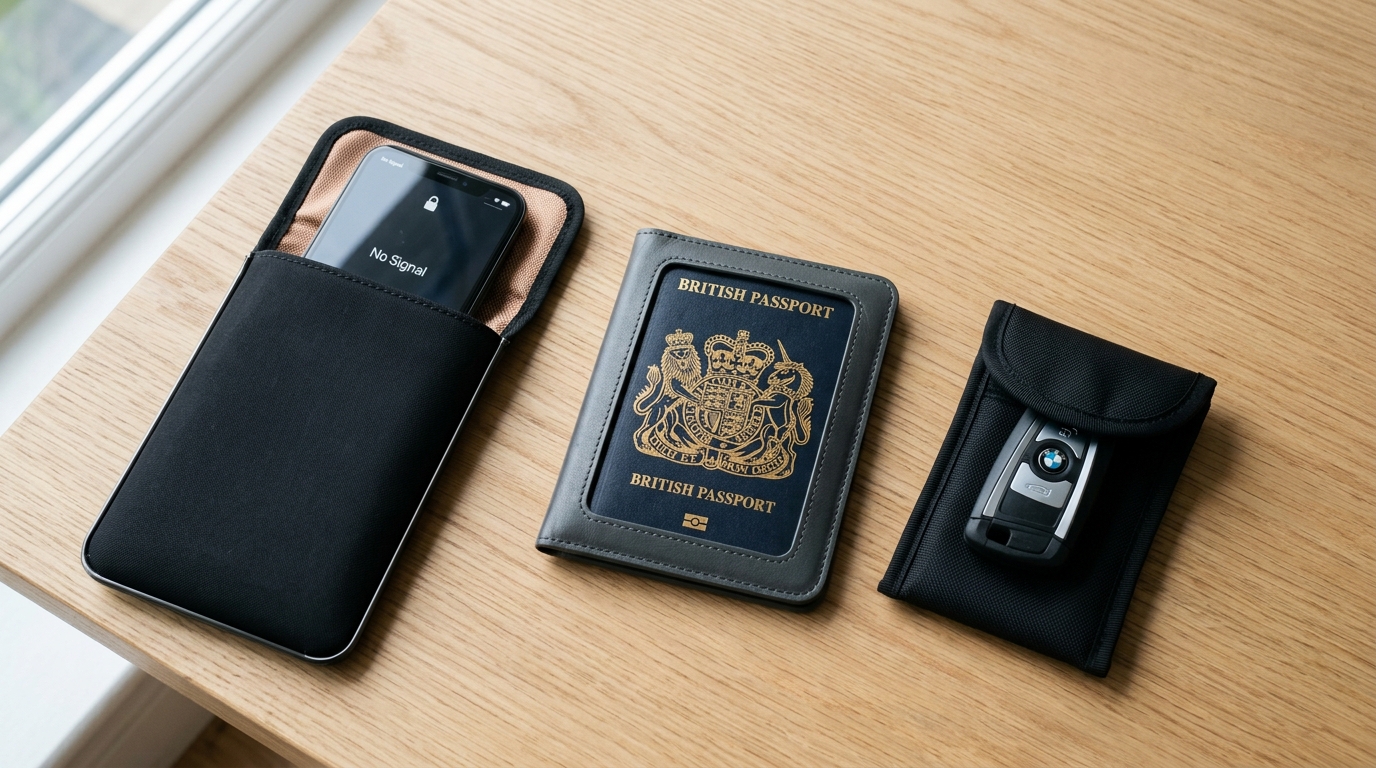
Laptop or tablet. A larger device means a larger enclosure, which changes fit, closure, and portability considerations — a laptop-sized bag isn’t something you’re pulling in and out of a pocket the way a phone pouch works. Full detail in Faraday bags for laptops.
Key fobs. Relevant mainly if you’re traveling with a car key you want to isolate — a rental car fob generally isn’t the same concern, since it’s not paired to your home or vehicle, but a personal fob you’re carrying does face the same relay-attack exposure covered in Faraday pouches for car keys. Don’t assume every traveler needs this — it’s relevant specifically if you’re carrying a susceptible keyless fob.
Other electronics. Beyond the above, most other travel electronics (cameras, e-readers, portable chargers without Bluetooth) don’t have a meaningful wireless attack surface worth shielding in the first place — there’s no point isolating a device that isn’t transmitting anything to begin with.
Do you need a Faraday bag for your passport?
This deserves its own, careful answer, because it’s a genuinely different technology question than shielding a phone. Modern e-passports include an embedded RFID chip used for biometric verification at border control, operating in the same general frequency range (13.56 MHz) as contactless payment cards. An RFID-blocking passport sleeve is designed specifically for this narrow frequency range — it is not automatically the same product as a broadband Faraday phone bag, and a bag rated for cellular/Wi-Fi/Bluetooth isn’t guaranteed to be evaluated for RFID performance at all, or vice versa. Don’t assume a product that protects one automatically protects the other — check that a passport-specific product actually addresses the RFID frequency, not just a general “signal blocking” claim.
Whether additional shielding is genuinely necessary for a passport is a separate, less settled question, and this article isn’t the place to make sweeping claims about skimming risk either way — treat an RFID sleeve as a low-cost, low-effort option if you want it, not a response to a well-quantified, urgent threat.
What about credit and debit cards?
Similar principle: contactless cards use NFC, in the same frequency range as passport RFID chips, and modern contactless payment systems already include their own security measures (transaction limits, encryption) that a physical sleeve doesn’t add to or replace — it addresses proximity signal exposure specifically, not the broader security of the payment system. As with passports, protecting a contactless card and isolating a cellular smartphone are different purchasing problems, even though both can technically be called “signal blocking.”
What happens to your phone while it's inside?
Briefly, since this is covered in full elsewhere: with sufficient attenuation, cellular, Wi-Fi, Bluetooth, and GPS all stop communicating, calls go to voicemail instead of ringing through, and apps requiring a live connection stop updating. What’s specifically relevant for travelers: when you take the device back out and it reconnects, queued messages and missed-call notifications typically arrive in a batch — being sealed doesn’t erase what happened while it was off-network, it just delays the phone’s awareness of it. Full detail in Faraday bags for phones and Can a phone be tracked inside a Faraday bag?
Airplane mode vs. a Faraday bag while traveling
Airplane mode is a software setting on the device; a Faraday bag is physical shielding external to it. This matters for travelers specifically because airplane mode’s actual behavior varies by device and OS version — Wi-Fi and Bluetooth can often be manually re-enabled while it’s otherwise “on,” which is exactly how in-flight Wi-Fi works. A Faraday bag isn’t something passengers generally need for flying — airlines and aviation authorities require airplane mode for a specific, different reason (preventing interference with aircraft systems), not as a privacy measure, and you can’t use a phone sealed in a bag the way you can one in airplane mode. Full comparison in Airplane mode vs. Faraday bag.
What to look for in Faraday bags for travel
What you're putting inside, first. Someone traveling with just a phone has completely different requirements from someone carrying a phone, tablet, and laptop together — decide this before looking at products.
Internal dimensions. Account for phone cases and actual device dimensions; the item shouldn’t interfere with proper closure.
Frequency coverage. Relevant to what you’re actually shielding — don’t assume a stated frequency range for phones automatically extends to a laptop’s Wi-Fi/Bluetooth needs, or to a passport’s RFID range.
Attenuation and evidence. The same standard as everywhere else on this site: a frequency range and attenuation figure are worth more than an adjective, and independent evidence beats a manufacturer’s own claim alone.
Closure. Especially important for travel bags, which tend to get opened far more often over a trip than a daily-use pouch does at home.
Durability. Travel products get packed, compressed, folded, and handled more than most — the same fabric-wear logic from Do Faraday bags actually work? applies, arguably more given how much handling a travel bag sees in a short period.
Portability. Weight, thickness, and packing size matter more here than on most pages on this site — a laptop-sized enclosure that’s genuinely bulky to pack is a real trade-off, not a minor detail.
Access. A practical question worth asking honestly: how often will you actually need the device? A beautifully shielded laptop bag becomes fairly irritating if you’re opening it every twelve minutes.
Organization. Multiple compartments can be useful for keeping items separate, but verify which compartments are actually shielded — not every pocket on a multi-compartment bag necessarily is.
Appearance. Travel bags don’t need to look tactical to work — a minor consideration, but a legitimate one if you’d rather not carry something that looks conspicuous.

A list of technologies on packaging isn’t the same as evidence the product handles all of them well. Worth asking: which frequencies specifically, what attenuation, was it tested, under what conditions, and is every compartment actually shielded? A product can be genuinely well-suited to one use case on that list without being equally rigorous for all of them — a bag good at phone frequencies isn’t automatically validated for RFID passport frequencies too.
One big bag or separate Faraday pouches?
One large enclosure is simpler if you’re carrying multiple devices — less to organize, one thing to seal — but opening it to access any single device exposes everything else inside at the same time, and larger enclosures are bulkier to pack. Separate pouches let you access one device without disturbing isolation on the others, and tend to be more individually portable, at the cost of having more items to keep track of. Neither is universally better — it depends on how often you need to access each item independently versus how much you’d rather manage one enclosure instead of several.
Faraday bags for travel worth considering
PrivacyLabz publishes product evaluations only when listings publish verified specifications or laboratory attenuation figures. Neither product has been physically tested by PrivacyLabz unless explicitly stated.
Evaluations in progress
Product candidate evaluations for travel enclosures (compact phone pouches, multi-device folios, and laptop sleeves) are currently in progress. Recommendations are withheld in accordance with PrivacyLabz editorial policy until vendors supply verifiable laboratory attenuation figures across relevant transit frequency bands.
Can you take a Faraday bag through airport security?
Multiple independent sources, including a direct quote attributed to TSA’s own “What Can I Bring?” guidance, consistently describe Faraday bags as permitted in both carry-on and checked baggage — they aren’t a prohibited item. The practical consideration is different: because the shielding material blocks an X-ray scanner from clearly seeing what’s inside, security staff may need to manually inspect the bag’s contents rather than clear it purely by X-ray. This isn’t the bag being flagged as suspicious so much as a routine consequence of the same material property that makes it useful — screening equipment relies on being able to see inside a bag, and shielding material interferes with that regardless of intent. Rules and specific screening procedures can vary by country and airport, so this is general guidance, not a guarantee for every checkpoint you’ll pass through. A Faraday bag doesn’t let you bypass screening, and treating it as a way to conceal contents from inspection isn’t what it’s for or how it will be treated if noticed.
How to test your travel Faraday bag before you leave
Nobody should discover at their destination that their shielding pouch never actually isolated anything. A short functional check before you travel: confirm cellular, Wi-Fi, and Bluetooth connectivity drop when the relevant device is sealed, and check key-fob functionality against your actual vehicle if that applies to you. A home functional test identifies obvious failures — it isn’t laboratory certification across every frequency, but it’s enough to catch a bag that simply doesn’t work before you’re relying on it somewhere inconvenient to find out. Full walkthrough in How to Test a Faraday Bag at Home →
When a Faraday bag is probably overkill
Most travelers don’t need to spend an entire trip carrying electronics inside RF-shielded bags. A Faraday bag is a specialized tool for situations where someone specifically wants physical radio isolation — it isn’t a general travel-security upgrade, and treating it as one risks solving an imagined problem instead of a real one. A Faraday bag solves a fairly specific problem. It isn’t a force field for your digital life, and ordinary travel-security practices — being aware of your surroundings, keeping devices updated, not connecting to obviously untrustworthy networks — address a different, more common set of travel risks that a shielded pouch doesn’t touch at all.
The bottom line
Faraday bags for travel are useful for specific devices in specific situations — not a blanket upgrade for everything in your carry-on. What you’re actually shielding matters more than any single product’s marketing claims: a phone, a laptop, a key fob, and a passport are genuinely different purchasing problems, even when a listing tries to bundle them into one solution. Not sure which Faraday product actually fits what you’re carrying? Explore our Faraday bags overview guide →
Frequently asked questions
Do I need a Faraday bag when traveling?
Only if you have a specific device you want to isolate — a phone, laptop, or key fob you’re carrying. It isn’t a general requirement for travel.
Can I take a Faraday bag on a plane?
Yes — multiple sources indicate they’re permitted in carry-on and checked baggage, though the bag may need to be opened for manual inspection since shielding material blocks X-ray visibility.
Can I put my passport in a Faraday bag?
A broadband phone-focused Faraday bag isn’t automatically validated for RFID passport frequencies — an RFID-specific sleeve is a more targeted product for that particular use.
Do Faraday bags block passport RFID?
Only if the product is specifically designed and evaluated for the RFID frequency range (13.56 MHz) — not every general “signal blocking” bag addresses this.
Should I put my phone in a Faraday bag at an airport?
Only if you have a specific reason to isolate it — there’s nothing about an airport specifically that requires this for most travelers.
Will GPS work inside a Faraday bag?
No, if the bag is providing adequate attenuation at GPS frequencies — but as with everything else here, that depends on the specific product.
Can I put a laptop in a Faraday bag?
Yes, provided the enclosure is sized and closed correctly for it — see Faraday bags for laptops for what changes at that size.
Does airplane mode do the same thing?
Not with the same certainty — airplane mode is a software setting that behaves inconsistently across devices, while a Faraday bag doesn’t depend on the device’s software state. Full comparison in Airplane mode vs. Faraday bag.
Sources used
- “How to Organize Travel Electronics in a Faraday Pouch for Airport Security” — Alibaba Product Insights (citing TSA Guidance). Guidance on checkpoint screening procedures and baggage allowance for electromagnetic shielding materials.
- “RFID Wallets and Airport Security Checkpoints” — Yahoo Travel / RFID Journal. Analysis by RFID Journal founder Mark Roberti on airport X-ray scanner penetration and manual physical bag inspections.
- “Faraday Bags for Phones: What They Block & How to Choose One” — PrivacyLabz Technical Analysis. Multi-band RF attenuation requirements across cellular, Wi-Fi, Bluetooth, and satellite navigation frequencies.
- “Airplane Mode vs. Faraday Bag: Which Actually Isolates Your Phone?” — PrivacyLabz Technical Analysis. Software radio toggling vs physical boundary containment during commercial air travel.