What is a smoke detector hidden camera?
A legitimate smoke detector is a safety device — it contains a sensor (ionization or photoelectric) designed to detect smoke particles, nothing else. A “smoke detector hidden camera” is a different object entirely: a camera housed inside something built to resemble a smoke detector, sometimes a real smoke detector modified to also contain a camera, sometimes a non-functional shell designed only to look like one. The two aren't the same category of object just because they look similar from across a room.
Normal Smoke Detector vs. Covert Camera Indicators
Comparing the visible physical anatomy of an authentic life-safety smoke alarm against observable anomalies typical of covert camera enclosures.
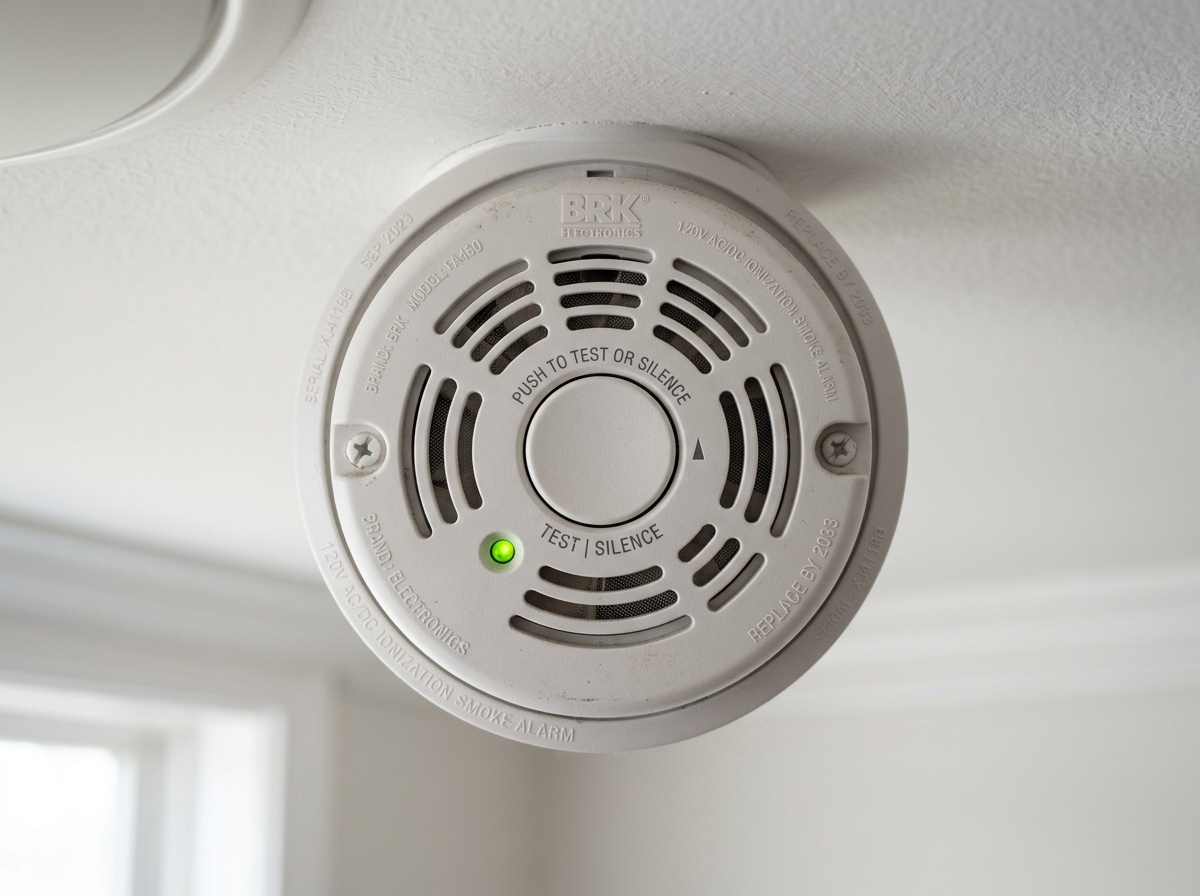
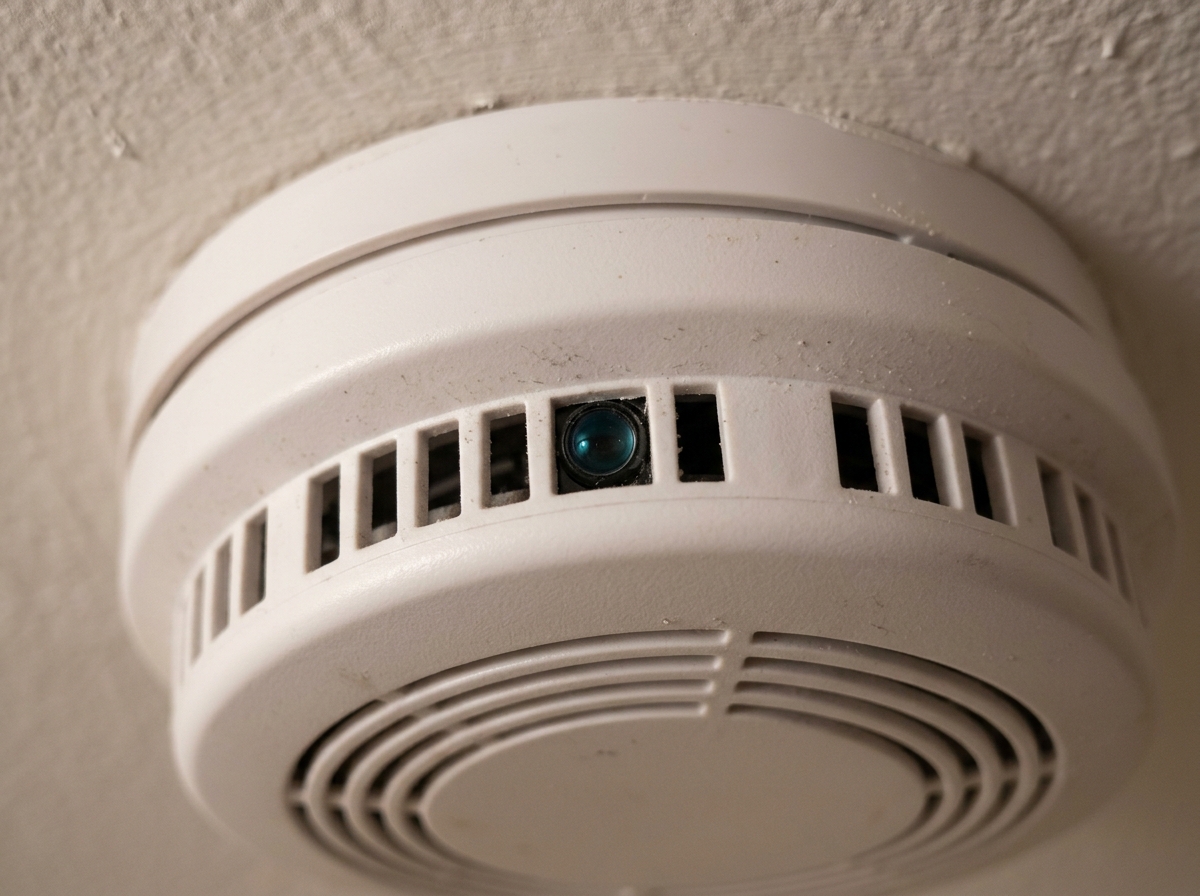
How to tell if a smoke detector has a hidden camera
No single check here is conclusive on its own. Each method below looks for different evidence.
1. Visually inspect it
Look for things that are genuinely out of place: an opening or hole that doesn't look like a standard sensor vent, a small reflective or lens-like surface, a housing that looks structurally different from other detectors in the same building, an odd mounting angle or position, or visible signs the unit has been opened or modified. None of these individually proves anything — manufacturers vary in design, and a slightly unusual-looking detector is far more often just a different model than a covert camera. Treat this as a first pass that might raise or lower suspicion, not a verdict.
2. Look for lens reflections
Camera lenses reflect light distinctively — shine a bright light or a flashlight into a suspected object from different angles in a dim room, and a lens will often produce a small, sharp reflective point that regular materials don't. This is the same principle dedicated optical/lens detectors use, usually with an LED or infrared light source and a viewfinder or colored filter to make the reflection easier to spot.
The real limitation: this method requires a direct line of sight to the actual lens. If the lens is angled away from you, obscured, or the object doesn't have an externally visible optical element at all, this method won't find it, however carefully you look.
3. Check for RF transmissions
An RF (radio frequency) detector detects radio-frequency energy in general — it does not detect “cameras” specifically. Most hidden cameras that transmit footage wirelessly (over Wi-Fi, Bluetooth, or a proprietary radio link) emit RF signals a detector can pick up, typically scanning a broad range roughly between 1 MHz and 6 GHz, alerting with a beep, vibration, or light, often with signal strength increasing as you get closer to the source.
This is a genuinely important distinction to understand: an RF detector responds to RF activity, not to a confirmed camera. A room with a phone, a router, Bluetooth headphones, a smart speaker, or other ordinary wireless devices nearby can trigger the same alert as an actual hidden camera would. Academic research on this exact problem notes that a basic RF/bug detector “can produce false alarms when used near other RF sources” and gives “no additional information about the type of device or where it is located” — it flags activity, and locating and identifying the actual source is left entirely to you. And a camera that records locally to a memory card rather than transmitting anything wirelessly won't produce a meaningful RF signal at all, so a clean RF scan doesn't mean a room is clear.
4. Network checks
Some wireless cameras connect to a local Wi-Fi network and may show up as a device on that network if you check connected devices through a router's admin page or a network-scanning app. This can occasionally surface something worth investigating further, but it's not a comprehensive method — a camera on its own separate network, using a cellular connection, or recording locally rather than connecting to the local Wi-Fi at all won't appear this way. Absence from a network device list doesn't mean a camera isn't present.
Visual inspection catches things that look physically wrong. Lens detection catches an exposed optical element you have a direct line of sight to. RF detection catches something actively transmitting nearby, mixed in with everything else in the room that also transmits. Network checks catch a device connected to the specific network you're checking. None of these catches everything the others miss, which is exactly why combining methods matters more than picking the “best” one.
Tools That Can Help Check for Hidden Cameras
Detection tools can help identify suspicious RF activity or lens reflections, but no consumer detector can guarantee that a room contains no hidden cameras.
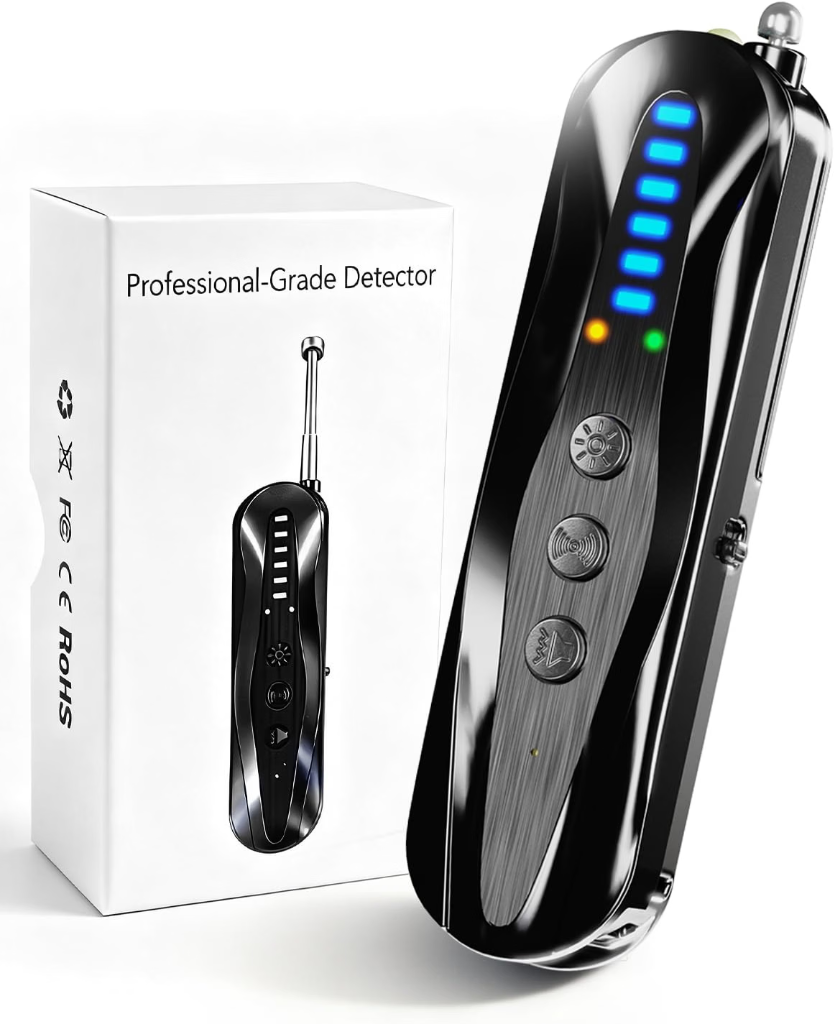
- Combines RF and optical detection in one device
- Compact format makes sense for travel
- Adjustable sensitivity can help narrow down a signal source
- An RF alert does not mean you've found a hidden camera
- Wi-Fi, Bluetooth and other legitimate electronics can trigger RF activity
- A camera recording locally may not be transmitting a useful RF signal
- Detection: RF + optical/lens detection
- Sensitivity: Adjustable
- Format: Rechargeable handheld detector
- Best for: Travel and general room checks
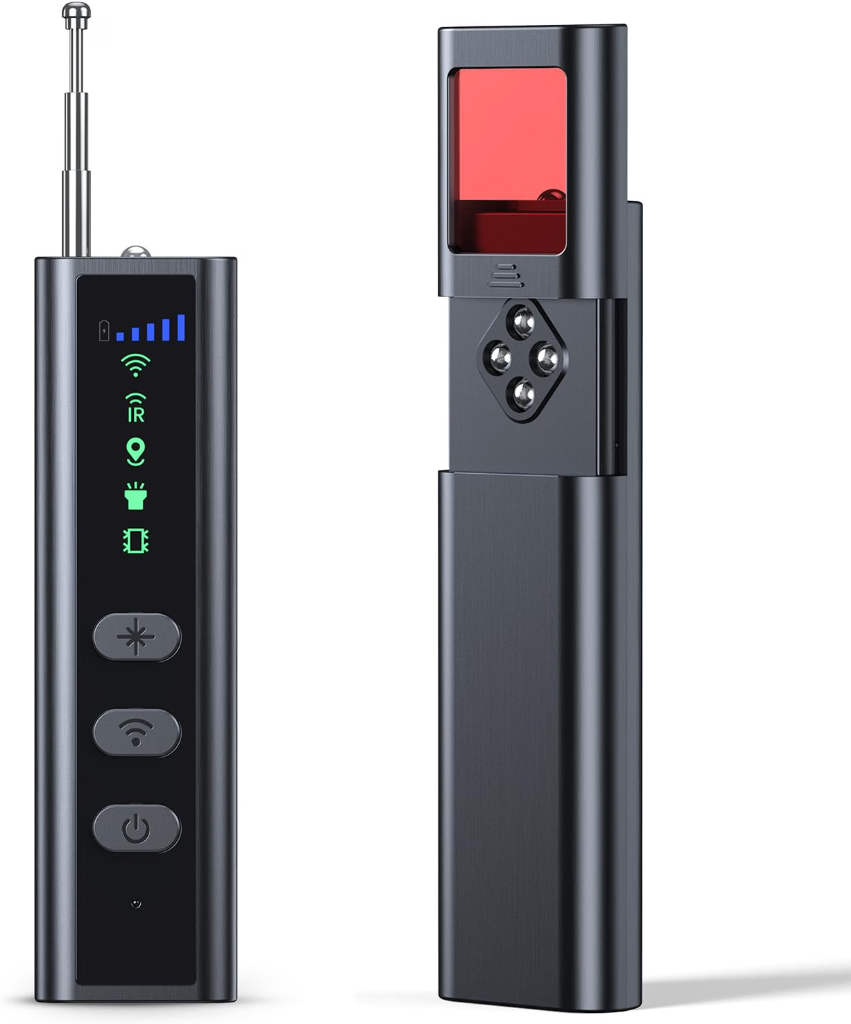
- Digital display provides more feedback while scanning
- Adjustable sensitivity can help narrow down an RF source
- Better suited to systematic room sweeps than relying on a phone app
- RF detection cannot identify what a transmitting device actually is
- Wireless-heavy environments can produce legitimate alerts
- Non-transmitting or locally recording cameras may not be detectable by RF scanning
- Primary detection: RF signal scanning
- Sensitivity: Adjustable
- Interface: Digital display
- Best for: More systematic RF room sweeps
*Editorial Note: Detection tools assist in locating anomalies, but physical inspection remains essential. Product slots represent the two foundational detector categories recommended for private room inspections.*
Can your phone detect a hidden camera?
Partially, and only for some methods. A phone's flashlight can be used the same way a dedicated lens detector's light source is — shine it into a suspected object in a dim room and look for a reflective point — though a phone's flashlight and camera aren't purpose-built for this the way a dedicated detector's filtered viewfinder is, making a genuine reflection harder to distinguish from an ordinary one. You can also check your phone's Wi-Fi settings or a network-scanning app for unfamiliar connected devices, which is the same network-check method described above, with the same limitations.
What a phone generally can't do reliably: detect RF transmissions with the sensitivity and frequency range of a dedicated RF detector (phone hardware isn't built for this), or magically identify a camera through an app alone. Independent testing of “hidden camera detector” phone apps has found their hardware limitations lead to frequent false positives and missed detections — useful as a rough first check, not something to rely on for a serious concern.
| Method | Useful for | Major limitation |
|---|---|---|
| Visual inspection | Spotting obviously out-of-place features | Doesn't confirm anything on its own |
| Lens/reflection detection | Finding an exposed camera lens | Needs direct line of sight |
| RF detector | Finding actively transmitting devices | False positives from ordinary wireless devices; misses non-transmitting cameras |
| Network inspection | Spotting a camera connected to the checked network | Misses cameras on other networks or recording locally |
| Phone apps | A rough first pass | Phone hardware isn't built for this; higher false-positive/miss rate than dedicated tools |
Do RF hidden camera detectors actually work?
They can genuinely help — an RF detector is a real tool that can locate an actively transmitting device you wouldn't otherwise notice. But it's worth being precise about what “work” means here: an RF detector detects RF energy, full stop. It doesn't distinguish a hidden camera's signal from your neighbor's Wi-Fi router, a Bluetooth speaker, or your own phone. A useful scan generally means minimizing other RF sources first (turning off nearby phones and wireless devices where practical) so a signal you do detect is more likely to be worth investigating, and then physically tracking down whatever's actually causing it rather than assuming the alert itself is proof. (See our upcoming technical guide on whether hidden camera detectors work once published.)
What if the camera records locally?
This is a distinction worth being clear about: a camera doesn't need Wi-Fi or any continuous RF transmission to record. A camera storing footage to a local memory card operates completely independently of any network or wireless signal, which means an RF detector — however good — has nothing to detect. “No RF detected” is not the same statement as “no camera exists.” This is exactly why lens/visual inspection matters as a separate, complementary method rather than a backup to RF detection — it's the one approach that doesn't depend on the device transmitting anything at all.
What should you do if you find a suspected hidden camera?
If you reasonably suspect an unlawfully placed camera, avoid unnecessarily handling, moving, or attempting to dismantle it — this can destroy evidence that might matter later, and in some cases could itself carry legal risk depending on the situation and jurisdiction. Where it's safe to do so, document what you observed (photos, location, timing) without disturbing the object further. Consider contacting the property operator, the booking platform if it's a short-term rental, and local law enforcement or relevant authorities, since surveillance and privacy laws — including what's actually illegal, and what a private individual is permitted to do about it — vary significantly by location, and this article isn't in a position to make universal legal claims that apply everywhere.
Frequently asked questions
Can a smoke detector contain a hidden camera?
Yes — miniature cameras can be built into or disguised as objects resembling smoke detectors. This doesn't mean any particular unfamiliar-looking detector actually contains one.
How can you tell if a smoke detector has a hidden camera?
No single test is conclusive. Visual inspection, lens/reflection checks, RF detection, and network inspection each look for different evidence — combining methods gives a more complete picture than relying on just one.
Do hidden camera detectors work?
They can genuinely help, within real limits. RF detectors find actively transmitting devices but can't distinguish a camera's signal from ordinary wireless devices, and lens detectors need a direct line of sight to an exposed lens. Neither guarantees a room is clear.
Can a phone detect a hidden camera?
Partially — a phone's flashlight can be used for a basic reflection check, and its Wi-Fi settings can show connected network devices. Phone hardware isn't built for genuine RF detection, and dedicated apps have a documented higher rate of false positives and missed detections than purpose-built tools.
Can an RF detector find a hidden camera?
It can find an actively transmitting device, which may be a camera — but it also responds to any nearby RF source (phones, routers, Bluetooth devices), and it can't detect a camera that isn't transmitting anything wirelessly.
Can a hidden camera work without Wi-Fi?
Yes — a camera can record locally to a memory card with no wireless transmission at all, in which case RF and network-based detection methods have nothing to find.
Will turning off the lights reveal a hidden camera?
Dim or dark conditions can make a lens detector's reflection technique easier to see clearly, since the reflected light stands out more against a darker background — but this only helps with the lens-detection method specifically, not RF or network checks.
Can a hidden camera record without transmitting a signal?
Yes — a locally-recording camera has no RF footprint at all, which is exactly why RF detection alone is never a complete check.
Sources used
- “I Always Feel Like Somebody's Sensing Me!” — arXiv (2021). Academic validation that consumer RF/bug detectors frequently generate false alarms when operated near ordinary ambient wireless sources, providing no autonomous classification of device type or exact location.
- “Understanding RF Sweeping and Optical Retroreflection Constraints” — OneSDR / Technical Security Analysis. Operational parameters for consumer RF sweeping bands (1 MHz–6 GHz), retroreflection line-of-sight constraints, and the zero-RF blind spot of local micro-SD storage cameras.
- “Evaluation of Mobile Applications for Surveillance Device Detection” — Journal of Information Security and Applications. Empirical benchmark analysis documenting smartphone antenna hardware constraints and false-positive rates compared to dedicated RF detection units.